
Field Rules Overview
To ensure a safe and enjoyable experience for everyone, please familiarise yourself with our field rules (full details are in our Booking Policy):
Arrival & Departure
-
Timing: Please arrive no more than 2 minutes early for your slot and ensure you leave before the next session starts.
-
Stay in your car: Wait in your vehicle until the previous user has left the field and safely secured their dogs.
-
Lock gates properly: Ensure all gates are securely locked behind you when entering and leaving the field.
Waste & Bins
-
Pick up dog waste: You must clean up after your dog immediately.
-
Use the correct bins: Separate bins are provided for general rubbish and dog waste—please do not mix these up.
General Rules
-
Be respectful: Treat the field, our neighbours, and other users with respect.
-
Report issues immediately: If you encounter any problems, notify us by phone straight away.
-
Cancellations: We require at least 24 hours' notice for cancellations. Please reschedule online if you need to change your booking.
-
Travel Updates: For live weather alerts, local roadworks, and anything affecting routes to the field, please join our WhatsApp group: 👉 Join our WhatsApp Travel Updates Group
🚫 STRICTLY PROHIBITED: Smoking and vaping are not allowed anywhere on the premises.
Anyone caught smoking or vaping will face an immediate, permanent ban from using the field.
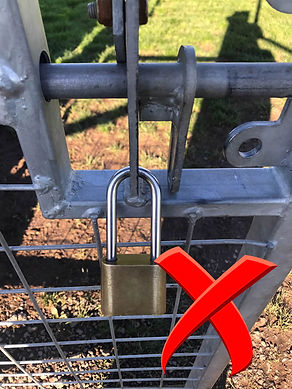
How do I lock the gates?
The vertical metal part of the bolt needs to be slid over the metal hole before the padlock is placed through it. The following video shows the correct way to lock the gate and what it looks like when locked correctly.


Why can't I see the booking page?
We made a change to the website so that only approved members can book. This was done to ensure that the booking details are always populated making the booking process smoother for customers. Please Log In using the link provided in the top right hand corner of the website. If you have forgotten your password please reset it following the instructions below. If you are having any problems, please contact us.
Where can I find the plans?
The plans have moved to the Book a Walk page and can be seen on the right of the Training Field tab.
Frequently Asked Questions
Rescheduling Bookings
It is simple to reschedule a booking via our website. The video below gives full instructions and shows what it looks like on a desktop PC. If you are using a mobile phone, the instructions are very similar. Please do get in touch if you need further clarification.